
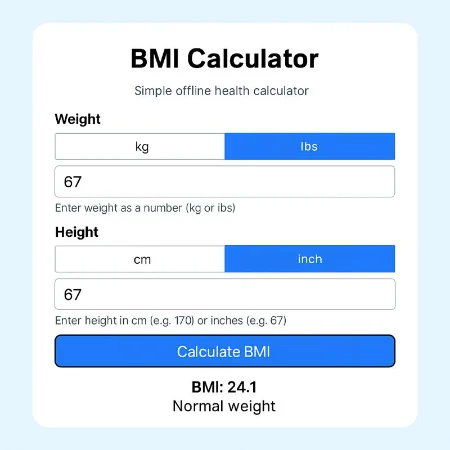
A BMI calculator is a simple health tool that helps you understand whether your body weight is appropriate for your height. BMI stands for Body Mass Index, a measurement commonly used by doctors and health professionals to assess weight categories.
This BMI calculator allows you to enter your weight and height using either metric units such as kilograms and centimeters or imperial units like pounds and inches. The calculation is performed instantly and shows your BMI value along with a clear weight category.
Body Mass Index is calculated by dividing your weight by your height squared. While BMI does not measure body fat directly, it provides a helpful general guideline for identifying potential weight-related health risks.
The BMI categories are underweight, normal weight, overweight, and obese. Being underweight may indicate nutritional deficiencies, while being overweight or obese can increase the risk of conditions such as heart disease, diabetes, and high blood pressure. A normal BMI range is generally associated with better overall health.
This BMI calculator is designed for adults and should be used as a general reference only. Factors such as muscle mass, age, and body composition are not considered in the BMI formula. For personalized medical advice, it is always best to consult a healthcare professional.
Using a BMI calculator regularly can help you monitor weight changes over time and support healthier lifestyle decisions. Combined with balanced nutrition, regular physical activity, and proper medical guidance, BMI can be a useful part of your overall health awareness.
How to Use the BMI Calculator
To use the BMI calculator, start by selecting your preferred measurement units. You can choose kilograms and centimeters or pounds and inches depending on what you are familiar with.
Enter your body weight in the weight field. Make sure the value matches the selected unit. For example, if kilograms are selected, enter your weight in kilograms.
Next, enter your height in the height field. If centimeters are selected, enter your full height as a number such as 170. If inches are selected, enter your total height in inches such as 67.
After entering your weight and height, click the calculate button. The calculator will instantly display your BMI value along with your weight category.
If you want to start over, click the reset button. This will clear all values and return the calculator to its default settings.
The result shown is intended for general health awareness only. If you have concerns about your weight or health, consult a healthcare professional.
download BMI Calculator