
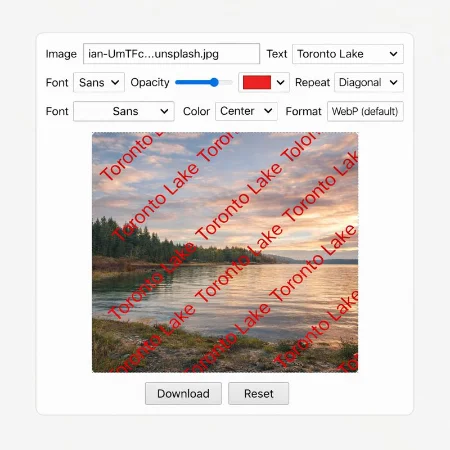
Adding a watermark to an image is an effective way to protect photos, designs, and digital content. A watermark helps indicate ownership, reduce unauthorized use, and add basic branding without changing the original image quality.
The Simple Watermark App is a lightweight browser-based tool created to do one thing well: add text watermarks to images quickly and easily. It runs directly in your browser and does not require installation, registration, or uploading files to a server.
To use the app, you simply choose an image from your computer and enter the text you want to use as a watermark. You can adjust the font, text size, color, opacity, and weight to match your needs. The watermark can be placed in the center or repeated diagonally across the image for stronger visibility.
The preview area shows a scaled version of your image so you can clearly see how the watermark will look before downloading. This preview is resized only for display purposes. The final downloaded image always keeps its original resolution.
When you download the image, only the image itself is saved. No preview background or extra space is included in the exported file. The watermark is applied directly to the image, ensuring clean and professional results.
The app uses WebP as the default export format, which helps keep file sizes small while maintaining good image quality. This makes it especially useful for websites, blogs, and digital products where fast loading times are important.
The Simple Watermark App is designed for users who want a straightforward and reliable tool without unnecessary complexity. Because the app works locally in your browser, your images are not uploaded or stored anywhere, making it a privacy-friendly option.
This tool is suitable for bloggers, website owners, photographers, students, and anyone who needs a quick and simple way to add text watermarks to images.
Download simple watermark app